
Cloudjiffy 6.0 VIEWPORT - Release Notes
In this document, you will find all of the new features, enhancements, and visible changes included in the CloudJiffy PaaS 6.0 release. 
New Features:
1. Non-Downgradable Software Stacks
CloudJiffy PaaS provides out-of-the-box support for multiple software stacks to build topologies that meet the most demanding users’ requirements. Moreover, most of the stacks have at least a few releases to choose from. These versions can be freely switched at any time due to the Containers Redeploy feature. However, not all of the software solutions provide backward compatibility. If there are substantial differences between the releases, downgrading a software version can result in unforeseen problems. In the current CloudJiffy 6.0 upgrade, all the stacks were analyzed to locate those vulnerable to the issue and explicitly restricted from downgrading during the redevelopment process. 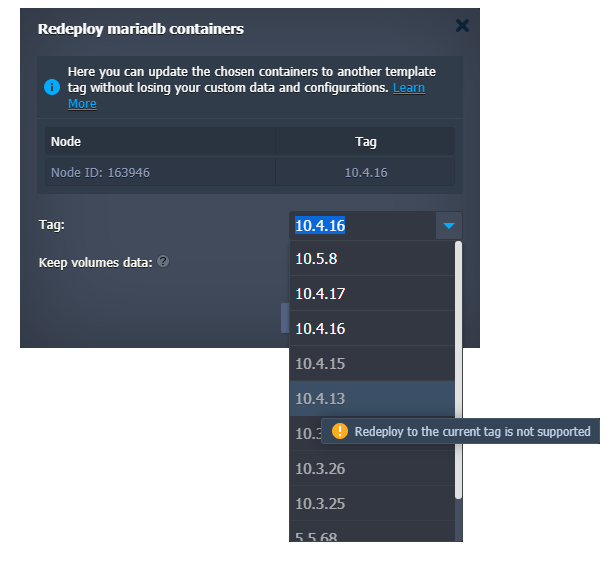 Currently, redeployment to the lower version is forbidden on the following stacks:
- MariaDB
- MongoDB
- MySQL
- Percona
- PostgreSQL
- Couchbase
2. Extended Target Node Filtering in Cloud Scripting
The targetNodes parameter is an optional config for the JPS add-on solutions that defines environments suitable for installation. In the current Cloudjiffy 6.0 release, its functionality was extended with an additional guestOSType filter, which lists the suitable OS templates for the add-on installation. The possible values are:
- LINUX
Changed Features:
1. Traffic Distributor Package Update
Traffic Distributor is a package powered by CloudJiffy, which helps control traffic flow between environments. It is an easy-to-manage solution suitable for multiple use cases and hosting scenarios (Blue-Green Deploy, Failover Protection, A/B Testing). In the present 6.0 CloudJiffy upgrade, CloudJiffy Team integrated the ability to choose between proxying traffic to backends over SSL or without it. The corresponding HTTPS config within the Traffic Distributor package UI is shown in the image below: 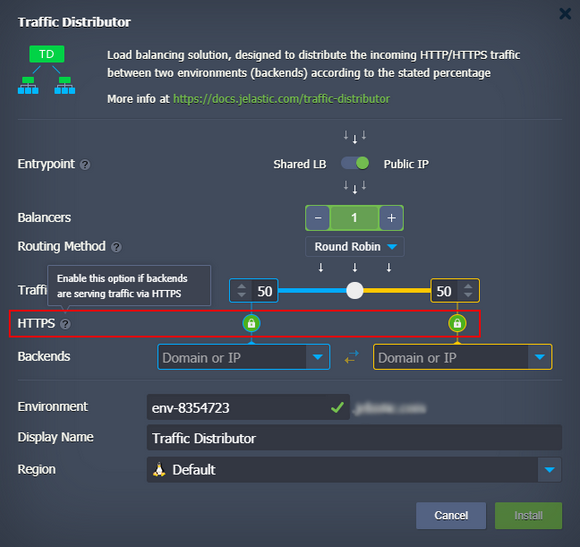 Also, the default value for the proxy_connect_timeout setting in Traffic Distributor was increased to 60 seconds to reduce the number of reconfigurations due to the false-positive backend failures. However, upon selecting the Failover routing method, this parameter is automatically changed to the 20 seconds value.
2. Extended Logs in Tasks Manager
Dashboard’s tasks manager provides all the vital information on the account activities. It helps developers with troubleshooting, issues analysis, and action tracking. In the current 6.0 Cloudjiffy release, the tasks manager was improved by providing additional log information for errors. This log field is present in the response of some error messages and contains valuable data for debugging.
3. No Free Disk Error Clarification
CloudJiffy PaaS has two types of the “No free disk space” error. The first one relates to the particular node and can be handled by the container owner. The second one reports the disk space shortage on the host (hardware server), which can only be resolved by the service hosting provider. In the present 6.0 upgrade, additional clarifications were added to separate such issues in the dashboard and provide correct resolution steps, i.e. either to increase disk space or contact support.
4. Binding Busy Domain Error Clarification
In the current CloudJiffy 6.0 upgrade, a validation message for the binding of a custom domain that is already used by some other environment on the platform was improved. For now, instead of a general error, it explicitly notifies that the specified domain is already in use. Moreover, if an external domain belongs to the same account, the error message will point to the appropriate environment.
5. Run.log Logrotate
Logrotate is a standard UNIX rotation and compression tool for log files. CloudJiffy PaaS automatically rotates all the main log files on the containers to ensure efficient disk space utilization without losing any crucial information from the log files. In the present 6.0 platform release, the run.log file was added to the list of logs that should be automatically rotated by the system.
6. API Changes
Below, you can find a list of all changes to the public Cloudjiffy API in the 6.0 platform version (compared to the preceding 5.9.8 ones):
- added new Get, SetSLBAccessEnabled, SetOptions, and ApplyData methods to the nodegroup service
- added a new GetNodeTags method to the control service
- added the lang optional parameter to the RecoverPassword method from the account service
- changed the search parameter to mandatory for the SearchActions method from the tracking service
Also, all the deprecated methods were explicitly marked in the API documentation.
Fixed:
1. CentOS 6 End-of-Life
CentOS 6 software stack support has officially reached its end-of-life. It will no longer get any updates and security fixes. In order to ensure that Cloudjiffy users operate with reliable and secure stacks only, CentOS 6 was removed from the list of supported OS templates on the platform. After the 6.0 upgrade, the creation of the new containers based on the CentOS 6 will not be possible, while any existing instance will remain fully operable. However, we strictly recommend updating to the 7th or 8th release versions via built-in redeploy functionality.
2. Fixes Compatible with Prior Versions
Compatible from
Description
JE-46524
3.3
The “Can’t read SSL certificate result:0” error occurs during the Let’s Encrypt add-on installation
JE-56808
3.3
The Mattermost Chat Service application does not work after installation from the Marketplace
JE-56836
3.3
Incorrect CSS styles for the Dokuwiki application from the Marketplace
JE-57107
3.3
The Plesk application does not work after installation from the Marketplace
JE-57192
3.3
The Ghost application does not work after installation from the Marketplace
JE-51924
5
The MySQL/MariaDB Cluster package installation should be restricted on account with insufficient quotas
JE-51882
5.4
Incorrect Add ProxySQL switcher state in the wizard for MySQL/MariaDB Cluster installed from the Marketplace
JE-54350
5.4
The minimum number of nodes for the MySQL/MariaDB Cluster package should be validated
JE-56429
5.4
An error occurs during the optimization.sh script execution on the LiteSpeed compute node of the WordPress Cluster package
JE-44501
5.7
Incorrect permissions for the /var/lib/proxysql/proxysql.log file on the ProxySQL node of the MySQL Cluster package
JE-53193
5.7
An error occurs during the Magento Cluster package installation due to incorrect stack tags
JE-53195
5.7
An error occurs during the WordPress Cluster package installation due to incorrect stack tags
JE-53763
5.7
Missing description for the add-ons installed during the WordPress Cluster package installation
JE-54980
5.7
The Strict-Transport-Security support for the test SSL certificate in the WordPress Cluster package should be disabled
JE-55902
5.7
LiteSpeed-related options are displayed incorrectly in the WordPress Standalone package installation window
JE-57121
5.9.1
The TimeZone Change add-on installation fails on the Ubuntu 20 VPS
JE-55026
5.9.2
Some redundant services are started on the Ubuntu 20.04 nodes after reboot
3. Bug Fixes
In the table below, you can see the list of bug fixes applied to the platform starting from Cloudjiffy 6.0 release:
Affected Versions
Description
JE-44112
-
The autofs mounts are not available for the systemd-based containers at the start
JE-44165
-
Different description for the same error on the Shared Storage node
JE-44377
-
Unhandled error when adding a mount point to the Shared Storage node
JE-47032
-
Unhandled error when creating a mount point with the unfsd process stopped
JE-49956
5.7.6
An error occurs when adding a load balancer node with public IP to application server with public IP and bound custom domain
JE-50494
-
FTP connection using “old” credentials can be established after the FTP add-on re-installation
JE-50828
-
Project update on the Golang servers fails for the password-protected repositories
JE-51077
5.7
The vsftpd service is still enabled on node after the FTP add-on removal
JE-51747
5.8.1
Container is stopped after the unsuccessful redeploy
JE-51825
5.8.1
The “Wrong cloudlets counts” error occurs when installing custom cluster with nodes in the extra layer
JE-51945
5.8.1
Account activation SMS cannot be re-sent on the same number during the registration
JE-52044
-
Warnings about deprecated parameters in logs after the Ruby server restart
JE-52063
5.7
Incorrect permissions for the /etc/autofs.conf configuration file on the Shared Storage node
JE-52166
5.8.1
Unhandled error when enabling firewall for containers with incorrectly configured /etc/sysconfig/iptables-custom file
JE-52561
-
Incorrect steps order in the two-factor authentication email
JE-52902
5.6
Incorrect CLI and platform versions comparison
JE-54255
5.9.2
Unhandled error when container cannot remove temporary locations during redeploy
JE-54680
any
The execution of the SwapExtIps API/CLI method between different regions should be validated
JE-54785
5.9.2
If HTTP to HTTPS redirect is enabled on the platform, it should work in the client libs as well
JE-54874
5.9.2
Web SSH console does not react on the keyboard inputs
JE-55003
any
FTP add-on should not be available for the Memcached nodes
JE-55025
-
An error occurs when creating a mount point from the Ubuntu-based VPS to a compute node
JE-55027
5.9.5
SSH connection to the Ubuntu-based VPS fails after container redeploy
JE-55090
-
An error occurs when creating a mount point from the Ubuntu-based VPS to a compute node
JE-55115
5.9.3
SSH connection to the CentOS 7 container cannot be established
JE-55132
-
Some redundant services are started on the Ubuntu 20.04 nodes after reboot
JE-55149
-
The “Tag is not allowed” error occurs during the container redeploy
JE-55230
5.9.2
Custom containers from the private Google container repository cannot be added
JE-55339
-
Incorrect permissions for the /var/lib/jelastic/overrides folder on the Tomcat node
JE-55379
5.9.5
NFS mounts are missing on the non-master nodes of a layer
JE-55478
-
Incorrect validation during environment migration between regions
JE-55590
-
Zero downtime deployment option does not work with VCS projects on the LiteSpeed application servers
JE-55598
5.9.4
Bound custom domain is not released after the appropriate environment deletion
JE-55617
5.8.1
Mount point cannot be removed on the Shared Storage node after restart
JE-55629
any
Incorrect tags sorting in the node redeploy window
JE-55707
-
Zero downtime deployment option does not work with VCS projects on the LEMP application servers
JE-55776
5.8.1
Project cannot be deployed into environment with application server in the extra layer
JE-55815
-
An error occurs if node’s home directory is a symlink
JE-55915
-
Internal network routes are missing after environment migration
JE-55943
5.9.6
NFS mounts does not work on the containers based on CentOS 6
JE-55962
-
The latest tag for custom containers disappears after its selection from the list
JE-56126
5.9.3
Container redeploy fails due to incorrect container status validation
JE-56145
5.9.4
An error occurs when adding nodes to the Shared Storage cluster
JE-56166
any
An error occurs when trying to deploy VCS project with submodules
JE-56278
5.9.6
Environment billing history does not work with custom localization
JE-56311
-
The Let’s Encrypt add-on cannot be installed if environment has and entry alias
JE-56414
5.8.5
An error occurs during the container redeploy
JE-56497
-
Incorrect node’s count validation in clusters
JE-56498
-
The Apply button in topology wizard should be disabled if there are validation warnings
JE-56556
-
List of shared environments in the collaboration email should be provided with the appropriate aliases
JE-56574
5.9.6
The password reset form should be in the same language as set in the dashboard
JE-56579
-
Incorrect Disk Limit slider behaviour when set below the minimum value
JE-56642
5.9.6
An error occurs when adding a large number of the VPS nodes simultaneously
JE-57217
5.9.6
An order is created by the auto-refill option for the removed users
JE-57299
any
Emails are displayed incorrectly in DarkMode on the iPhone/MacOS
JE-57437
-
Transfer of an environment without VM nodes fails due to the target account not having a VM nodes support
You can reach out to our support at support@cloudjiffy.com if you have any queries.
Ready to deploy on Cloudjiffy?
Start your 14-day free trial — no credit card required.
Create free account