
CloudJiffy 7.3 Release Notes
In this blog, you will find all of the new features, enhancements and visible changes included to the CloudJiffy 7.3 release.
Whats New :
Dashboard Performance Optimization
One of the major benefits the platform is renowned for is a versatile and robust user interface. It provides users with all the necessary tools to track and manage all hosted resources. However, when working with a large number of environments on the account (over 100), the drop in the dashboard’s performance can be noted. In order to resolve the issue and improve customers’ experience, several internal optimizations were applied in the 7.3 platform release to boost the operation speed when working with a lot of environments. Among the applied changes, the most notable are:
- significantly improved the dashboard initialization time
- optimized operability in the Firefox browser
- optimized floating menu, search, and environment list components
Ubuntu 22 Support
The platform introduces support of the latest Long Term Support release for one of the world’s most popular Linux distributions - Ubuntu 22.04 LTS (Jammy Jellyfish). The update integrates the base operating system template (for custom Docker containers) and adds the Ubuntu 22.04 VPS stack. Moreover, the distribution support is automatically available for all platform versions since the 6.0.2 release via the appropriate patches. 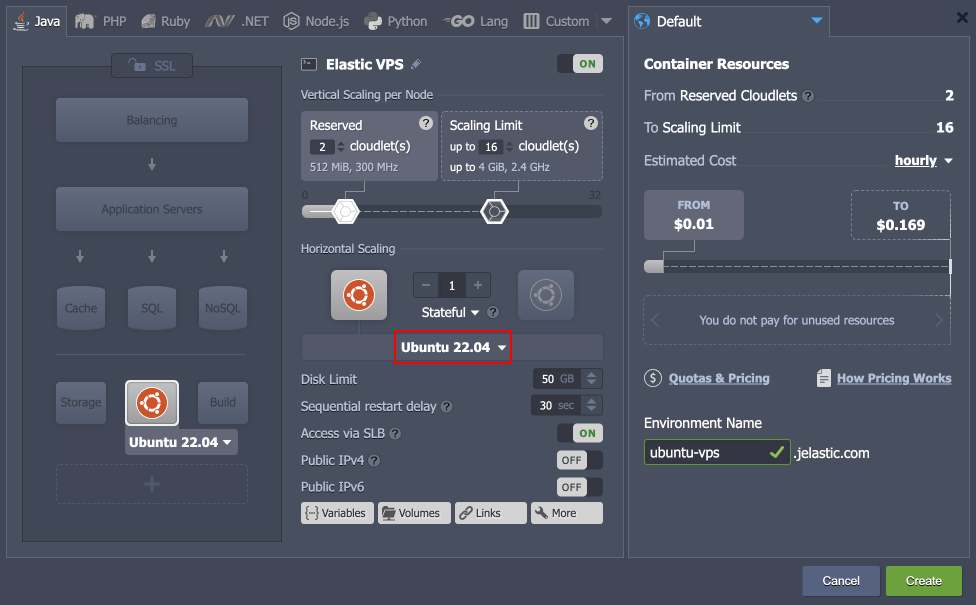
API to Move Public IPs
The new MoveExtIP API method allows moving external IP addresses from the source node to the target node. It complements the existing SwapExtIps API, making the management of existing public IPs more flexible. Additionally, the new method supports nodes with multiple IPs and can manage them in a single API call. The following parameters should be specified for the MoveExtIP method:
- envName - source environment name
- session - user session or personal access token
- sourceNodeId - source node ID (from the source environment)
- targetNodeId - target node ID
- ips - a comma- or semicolon-separated list of IP addresses that should be transferred (use “*” to move all the source node external IP addresses)
Note: The UI implementation of moving public IPs will be provided in future releases.
CentOS Stream 8 OS Support
CloudJiffy supports the most popular operating system templates, which allows using multiple different solutions from Docker Hub as custom containers. Due to the recent CentOS Linux 8 end of life, the recommended alternative template was added to the platform – CentOS Stream 8. You can find a comparison of these two versions in the official documentation.
Note: Do not confuse OS templates (base image for containers) support with container templates
Send Message API with IP Authorization
In the current 7.1 PaaS release, two new API methods were implemented for sending email notifications from the container to its owner. These methods provide automatic authentication based on the container IP address so that user session (password and login) is not required. Such implementation significantly simplifies notification of the container owner based on the events inside the node, which allows automating various scenarios that previously were difficult in realization. Both new methods are part of the environment > node service:
- SendEvent - sends a predefined event using IP authorization
- eventName - the name of the required event; currently, the following values are supported:
- SEND_NOTIFICATION - sends an email notification to the node owner
- OOM_KILLER - sends a message after OOM Killer invocation
- CUSTOM_NODE_EVENT - a user-defined custom event
- params - JSON object with parameters for Cloud Scripting
- eventName - the name of the required event; currently, the following values are supported:
- SendNotification - sends an email notification to the node owner using IP authorization
- name - title of the message
- message - body of the message
The platform already utilizes these new methods to provide proper notification about changes in containers - for example, automatic notifications due to smart recovery after the OOM error. Developers can benefit from the implementation by extending their custom packages with automatic notification of the container owner based on some specific condition.
Changes:
Platform Optimizations
Below you can find a number of optimizations implemented in the current 7.3 release to boost performance and enhance the user experience when working with the platform:
- Optimized SSL certificate requests to prevent a vast number of queries to the platform database. It results in a faster response of the hosted services in case of multiple simultaneous requests.
- Improved the security of some platform cookies with the additional “HttpOnly” and “Secure” flags.
- Changed the error code for the “limit_conn” problem from 503 to 429. The new code better corresponds to the generally accepted rule of code interpreting (i.e. 4xx - client error; 5xx - server error).
Show Logs Button in Dashboard Notifications
In the current 7.3 platform release, the ability to display the Show Logs button within the ‘warning’ and ‘error’ dashboard notification was implemented. Previously, such functionality was available for the ‘info’ notifications only. The implementation allows custom package developers to handle errors more naturally. Namely, the log file may contain additional information on the occurred issue and even some suggested resolution steps.
API Changes
Below, you can find a list of all changes to the public API in the 7.3 platform version (compared to the preceding 7.1 ones):
- Implemented a new MoveExtIP API method (the binder service) that can move external IP addresses between containers and can operate with multiple IPs
- Added a new GetBasicEnvsInfo API method (the control service) to improve the dashboard loading speed
Two new API methods were added to the environment > node service, implementing a simplified flow to notify the container owner (using IP authorization instead of user session):
- SendEvent - sends a predefined notification based on the specific event inside a container
- SendNotification - sends a custom email notification to the node owner
Collaboration Policy for Custom Commands
In order to extend the capabilities of the account collaboration feature even further and ensure the possibility of providing full access to the shared account, a new Execute CMD policy was added. If included in the collaboration role, it allows members to execute custom CMD commands on the shared environments. This permission may be required when installing some complex JPS solutions.
Environment Selection Field Adjustment
In the current CloudJiffy 7.2 release, the dashboard’s combo-boxes for environment selection were improved. For now, the displayed items provide better clarity by showing both the custom alias (if specified) and the environment name. Such implementation uniquely identifies the provided options and helps avoid possible confusion when several environments have similar aliases.
Fixed
Fixes Compatible with Prior Versions
Below, you can find the fixes that were implemented in the CloudJiffy 7.3 release and also integrated into previous platform versions by means of the appropriate patches.
#
Compatible from
Description
JE-60375
any
An invalid SSL certificate is issued when installing the Docker Swarm application with the Portainer option enabled
JE-62024
any
The file-sync add-on does not work with the LLSMP stack
JE-62554
any
WildFly Cluster nodes are not displayed in the admin panel of the controller node
JE-62881
any
An error occurs when installing OpenSearch for the Magento or Magento Cluster application
JE-63203
any
An error occurs when installing the Magento or Magento Cluster application from the Marketplace
JE-63204
any
An error occurs when installing the IOTA application from the Marketplace
JE-57124
3.3
The Eclipse Vert.x Thin Jar Builder application does not work after installation from the Marketplace
JE-60130
3.3
The Rocket.Chat application does not work after restarting the environment
JE-60291
3.3
The PrestaShop application does not work with the platform’s Built-In SSL feature
JE-60583
3.3
An error occurs when installing the Eclipse Che package from the Marketplace
JE-61972
3.3
An error occurs when installing the Let’s Encrypt add-on with a domain that has a redirect
JE-62363
3.3
Cron tasks on all nodes of the layer should be cleaned up upon the Let’s Encrypt add-on removal
JE-62499
3.3
Let’s Encrypt certificate update operation cannot be performed by the collaboration member
JE-63271
3.3
An error occurs when installing the Drupal application from the Marketplace
JE-62684
5.3
The Open Liberty application does not work in the Kubernetes Cluster
JE-60417
5.7
The Galera Cluster application does not work after restarting the environment
JE-59951
5.9.2
An error occurs when installing the Jira package from the Marketplace
JE-51420
any
The project is not updated by the Git-Push-Deploy add-on if the VCS auto-deploy option is disabled
JE-59566
any
An error occurs when installing the IOTA Node application from the Marketplace
JE-62033
any
The File Synchronization add-on does not support LiteSpeed and LLSMP stacks
JE-58866
3.3
Redundant information in the error message if the Let’s Encrypt add-on installation fails
JE-62184
3.3
The WAF module for the BitNinja add-on does not work on the nodes without public IP
JE-62385
3.3
An error occurs when installing both BitNinja and Let’s Encrypt add-ons
JE-60123
5.0.5
Errors in the opensearch-cluster.log file after the OpenSearch Cluster package installation
JE-61060
5.0.5
An error occurs when connecting from the Apache Python application server to the PostgreSQL database
JE-61650
5.0.5
Problems with installation of some RPM packages on the old MariaDB versions
JE-62374
5.0.5
An error occurs when restarting Tomcat, TomEE, WildFly, and Apache Python nodes
JE-62560
5.0.5
Nodes added via the horizontal scaling are not included in the MinIO Cluster
JE-47553
5.3
An error occurs when establishing a connection from the WildFly admin panel to the database
JE-60286
5.4
The sendmail process is not started within the Debian VPS container
JE-59471
5.7
Database credentials are missing in the email when cloning an environment with the MySQL/MariaDB auto-cluster
JE-59918
5.7
Data mounts are absent on the new WordPress Cluster nodes after horizontal scaling
JE-60860
5.7
The gd library is missing for the WordPress packages based on the LiteSpeed application server
JE-58719
5.7.4
An error occurs when changing the permalinks option for the WordPress Cluster on the LiteSpeed server with WAF enabled
JE-61925
5.7.4
After the GlusterFS cluster redeployment, nodes added via horizontal scaling are not included in the cluster
JE-46279
any
An error occurs when installing the Minio Cluster package from the Marketplace
JE-57935
any
Errors and warnings during the LiteSpeed and LLSMP stacks restart are displayed incorrectly
JE-58694
any
When using the prepackaged Jitsi application, all users are disconnected upon any user being kicked or if the moderator leaves
JE-58696
any
When using the prepackaged Jitsi application, audio and video are not working in conferences with multiple users
JE-61742
any
An error occurs when installing the IOTA Nodes application
JE-59897
3.3
An error occurs when installing the Liferay prepackaged application from the Marketplace
JE-60685
3.3
The prepackaged Odoo application is down after the application server restart
JE-61879
3.3
An error occurs when installing the BitNinja add-on on the LEMP stack
JE-61887
3.3
Credentials are displayed in one line in the success pop-up for the IOTA Nodes application
JE-61951
3.3
The BitNinja add-on is not supported on some templates
JE-60272
5.0
An error occurs when installing the JMeter JPS package
JE-61334
5.0
Incorrect credentials are sent via email for the OpenVPN application from the Marketplace
JE-46294
5.0.5
The Elytron subsystem is unavailable on the WildFly nodes after creation
JE-47222
5.0.5
The HTTP/2 is not supported on some versions of the Apache PHP application servers
JE-48295
5.0.5
The /var/lib/jelastic/backup directory is missing on the MongoDB database containers
JE-49577
5.0.5
The yum install command is not working on the MongoDB database containers
JE-49762
5.0.5
Errors in logs after restarting the MongoDB database containers
JE-50064
5.0.5
The Let’s Encrypt add-on installation breaks symlinks in the Python application servers
JE-50130
5.0.5
The Node.js restart hangs if called during the add project operation
JE-50413
5.0.5
Incorrect response for the jem service start/stop/restart/reload commands on the VPS nodes
JE-50463
5.0.5
Incorrect template version in the metainf.conf file for the NGINX PHP servers
JE-50472
5.0.5
Incorrect path for the backup shortcut on the MongoDB nodes
JE-50633
5.0.5
Empty template version in the metainf.conf file for the Percona servers
JE-50709
5.0.5
The JavaEngine server based on OpenJDK 14 is down after deploying an application
JE-50890
5.0.5
Warnings about the deprecated ssl directive are present in the NGINX load balancer logs
JE-50935
5.0.5
Incorrect access permissions to the /var/log/redis/redis.log file on the PHP-based application servers
JE-52064
5.0.5
Incorrect regex for deleting upstreams from load balances
JE-52160
5.0.5
GlusterFS cluster is not operable after downgrading (redeploying to a lower version)
JE-53278
5.0.5
Jetty servers are not accessible after installing the Let’s Encrypt add-on
JE-55725
5.0.5
Incorrect permissions for the /usr/java directory on the JavaEngine stack with the Dragonwell JDK
JE-56570
5.0.5
Invalid mbstring module configuration options in the php.ini file
JE-56705
5.0.5
Incorrect error message for the unsuccessful Storage node restart
JE-56927
5.0.5
An error occurs when installing the GitLab package from the Marketplace
JE-57013
5.0.5
The /var/log/haproxy/haproxy.log file is not rotated via logrotate on the HAProxy stack
JE-57468
5.0.5
An error occurs when disabling SSL on the Varnish stack
JE-57764
5.0.5
An error occurs when adding new nodes to the MySQL cluster
JE-57994
5.0.5
The Ruby application is down if installing Let’s Encrypt after removing the FTP add-on
JE-58326
5.0.5
An error occurs when deploying an application on the GlassFish stack
JE-58733
5.0.5
The btmp and wtmp files are not rotated via logrotate on the CentOS VPS stack
JE-59396
5.0.5
Incorrect repository details on the NGINX PHP stacks
JE-59914
5.0.5
The “cannot change locale” error occurs when connecting to the node via the SSH gate
JE-60016
5.0.5
Custom SSL is unavailable on the Varnish nodes after redeploy
JE-60446
5.0.5
Password information is missing in the email for the cloned PostgreSQL Cluster environment
JE-60662
5.0.5
Incorrect permissions for the /etc/logrotate.d/nginx file on the NGINX load balancer stack
JE-61807
5.0.5
An error occurs when deploying an application to the Apache Ruby stack
JE-52987
5.3.2
Some instances of the WildFly auto-cluster clone are broken
JE-52990
5.3.2
Removed worker instances are displayed in the WildFly DAS node
JE-53722
5.3.2
Auto-clustering is not properly removed when deleting all WildFly nodes from the topology
JE-54454
5.3.2
An error occurs when undeploying application from WildFly Cluster after removing the public IP address
JE-55418
5.3.2
The WildFly application is down when enabling auto-clustering after redeployment from the old version to the one with the feature support.
JE-57872
5.3.2
An error occurs when restarting WildFly nodes after adjusting the STANDALONE_MODE_CONFIG variable
JE-60691
5.3.2
An error occurs when installing the WildFly Cluster prepackaged solution from the Marketplace
JE-61605
5.3.2
An error occurs when deploying an application to the WildFly stack with JDK 17
JE-61959
5.4
An error occurs when installing the MySQL Cluster package from the Marketplace
JE-51972
5.5
Payara Cluster servers are down after restarting the environment
JE-52337
5.7
An error occurs when cloning an environment with the WildFly auto-cluster
JE-53610
5.7
An error occurs if removing worker nodes while logged into the WildFly DAS admin panel
JE-53691
5.7
After environment migration, instances are displayed as stopped or broken in the WildFly DAS admin panel
JE-54530
5.7
The maximum number of environments on the account should be verified when installing the Magento Standalone package
JE-50427
5.7.2
The 404 Not Found error is displayed for the LLSMP applications deployed to the non-root context
JE-50842
5.7.2
Warnings in the phpMyAdmin panel for the LLSMP stack
JE-50924
5.7.2
Errors in the admin panel after the LiteSpeed/LLSMP node creation
JE-51141
5.7.2
The phpMyAdmin folder is not available via FTP on the LEMP/LLSMP nodes
JE-57337
5.7.2
The firewall is not working on the LiteSpeed ADC stack
JE-55672
5.7.4
The GlusterFS Replication add-on should not be removable after configuring GlusterFS Cluster
JE-57739
5.7.4
LiteSpeed ADC admin panel is not available via IPv6
JE-58575
5.7.4
The force_kill function works incorrectly on the LiteSpeed ADC stack
JE-62173
5.7.4
An error occurs when installing the TimeZone add-on on the Ubuntu and Debian VPS stacks
JE-52065
5.8
Two controller nodes are added to the Extra layer when creating WildFly auto-cluster via the topology wizard
JE-52988
5.8
The dashboard should display a button to access the WildFly DAS admin panel on the layer level (not for a separate node)
JE-54090
5.8
An error occurs when creating the WildFly auto-cluster
JE-56167
5.8
An error occurs when installing the Jenkins instance via the topology wizard
JE-61169
5.8
Unclear UI for the Elastic Beats add-on installation frame
JE-61170
5.8
Errors in CS logs after the Elastic Beats add-on installation
JE-61177
5.8
Incorrect permissions for the /etc/heartbeat folder after the Elastic Beats add-on installation
JE-61846
5.8
After the Elastic Beats add-on deletion, the /etc/heartbeat folder is not entirely removed
JE-61641
7.0
An error occurs when installing the CDN add-on
JE-62351
any
Worker nodes of the Couchbase CE Cluster are down after the package installation
JE-60134
3.3
Incorrect Content-Security-Policy header in the NGINX configurations of the WebMail Lite package
JE-60834
3.3
An error occurs when installing the Plesk package
JE-62379
5.3
Worker nodes of the Couchbase CE Cluster are down after the environment restart
JE-61765
7.0
If installed by a collaborator, the Open Liberty application is created without the Storage node
Bug Fixes
In the table below, you can see the list of bug fixes applied to the platform starting from CloudJiffy 7.3 release:
#
Affected Versions
Description
JE-33215
5.2
An error occurs when backing up the containers during the dashboard operation
JE-40710
5.2
Incorrect permissions for some authentication configuration files in containers
JE-50464
5.7.8
Directory mounts are missing after container redeployment to the alpine-based image
JE-51538
-
Slow response of the GetEnvs API method for environments with many external domains
JE-62454
7.0
Incorrect escaping for special characters in the environment variables
JE-62724
-
Password authentication should be disabled when connecting over SSH
JE-62906
-
The autofs service start is delayed after the container restart
JE-62934
-
An error occurs when creating nodes based on the httpd:2.4-alpine image
JE-62943
-
An error occurs if the manually created firewall set has the same name as any of the system ones
JE-62946
-
Insufficient permissions to attach/detach add-ons are provided via the Containers > Add-Ons collaboration policy
JE-62983
-
Insufficient permissions to swap IPs are provided via the Environment > Managing > Edit Environment collaboration policy
JE-55128
-
Environment transferring requests to yourself is not validated when executed via API
JE-55797
-
An error occurs when installing required packages for the custom Docker containers
JE-56611
6.0
Active shares should be unmounted after autofs timeout
JE-59371
6.1
FTP add-on does not work in the cloned environments
JE-61758
-
A warning notification is shown when starting the openrc-jelinit service on the alpine-based containers
JE-61760
-
An error occurs when installing alpine-based custom Docker containers
JE-62128
6.0.6
An error occurs when redeploying containers with modified configs
JE-62343
7.0.2
An error occurs when removing a custom container from the topology via the dashboard
JE-62364
-
The file manager tab in the dashboard does not automatically become operable after the layer restart operation is finished
JE-62457
7.0.2
A collaboration member with full rights cannot download from the shared environment via the dashboard’s file manager
JE-62608
-
An error occurs when starting the openrc-jelinit service on the alpine-based containers
JE-62610
7.0.2
An error occurs when exporting billing history from the dashboard
JE-62615
-
Incorrect escaping for the “!” symbol in the environment variable value provided via the dashboard
JE-62617
-
An error occurs when trying to install an add-on from the Marketplace on the account without any environments
JE-62636
-
Duplicated records in the configuration file after container redeployment failure
JE-62650
7.0
Default placeholders are not replaced in the collaboration emails
JE-62664
-
If billing history is downloaded for the specific environment and not the whole account, the filename should contain the appropriate environment name
JE-62726
7.1.2
An error occurs when loading variables or redeploying a container if the first variable in the configs is empty
JE-62729
-
An error occurs after the Spring Boot Thin Jar Builder package installation
JE-62804
-
An error occurs when a collaboration member with the ‘Cost Estimation / Billing History’ policy tries to download billing history for the shared environment
JE-43124
5.5
The disk IOPS value is not calculated on the containers
JE-45740
-
The sendmail application is not available in containers
JE-50964
5.8
The redeploy operation should check for enough disk space inside the container
JE-51106
5.8
Exports records and iptables rules are not removed when unmounting a folder with the “+” symbol in the path
JE-52664
-
The site cannot be reached after the FTP add-on installation on the GlassFish/Payara containers
JE-55234
5.9.4
An error occurs when redeploying the Ubuntu VPS 10.04 container
JE-59950
-
An incorrect launcher is used for entrypoint commands in custom containers
JE-60719
6.3
An error occurs when transferring an environment to a user outside of the collaboration
JE-60795
7.0
An error occurs when transferring an environment to a user in a “pending acceptance” collaboration status
JE-61892
-
Invalid pgrep option error occurs when creating containers
JE-61942
-
An unhandled error occurs when deploying a damaged archive to the PHP environment
JE-62156
7.0
Incorrect wizard behavior when adding a template that does not correspond with the selected layer
JE-62378
7.0
The “`” character is not properly escaped when defined in the container variables
JE-62393
-
Permissions issue when installing JPS to the owner account as a collaboration member
JE-62393
-
Permissions issue when installing JPS to the owner account as a collaboration member
Ready to deploy on Cloudjiffy?
Start your 14-day free trial — no credit card required.
Create free account