
CloudJiffy 8.2.4 Release Notes
In this document, you will find all of the new features, enhancements, and visible changes included in the CloudJiffy 8.2.4 release.
What’s New?
SSH Key Types Support
The ECDSA key type is rapidly gaining popularity as an alternative to the standard RSA keys. As a result of such a growing demand, the platform implements support of this new SSH key type in the current 8.2.4 PaaS version. Additionally, the deprecated ssh-dss (DSA) public key algorithm is now explicitly forbidden instead of just being recommended against. The platform will show a warning about insufficient security level when trying to add a DSA key. However, the already existing keys will not be affected in any way. Currently, the platform supports the following SSH key types:
- ECDSA
- EdDSA
- RSA
Subscription Based Solutions
CloudJiffy implements a native ability to offer products based on the subscription model. The flow is standard to the modern subscription services implementations – a one-time fee to get a designated product for a specified period. The solution gives you a fix-priced alternative to the default usage-based model. All the available subscriptions are available at the Marketplace under a new Subscription Plans section. Upon selecting, you’ll see several plans to choose from (e.g. offering a different quantity of resources, additional features, etc.). Click the Buy button for the preferred option to see the purchase dialog. You can pay monthly or annually, enable auto pay with your default payment method, and set the required number of product instances in your subscription. 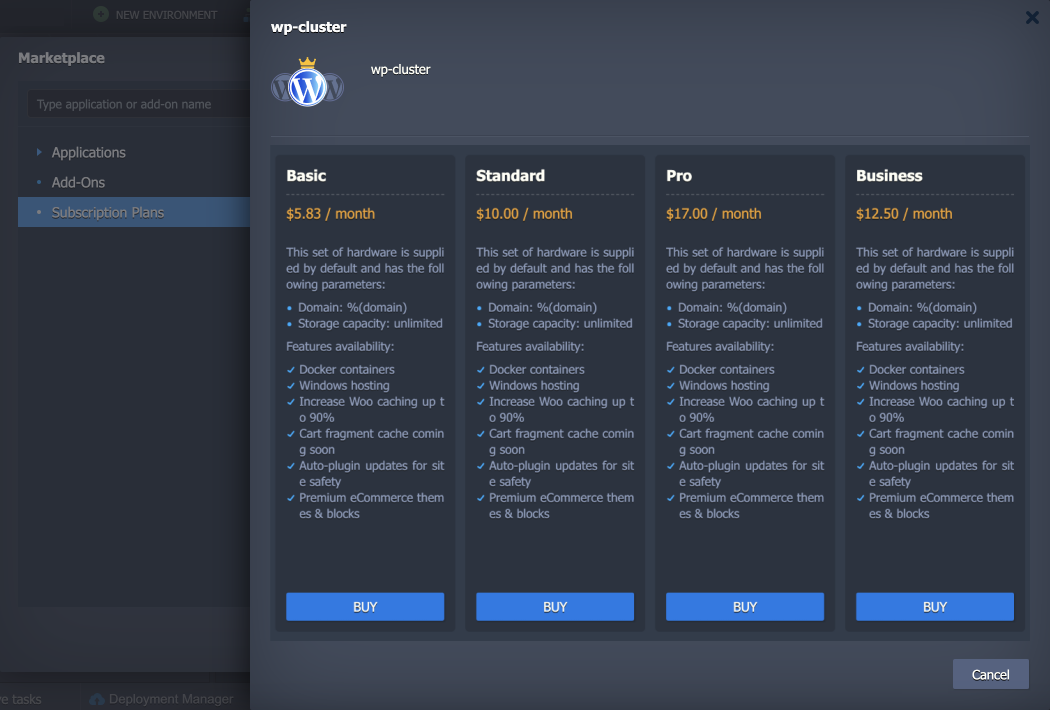 All the Subscriptions are added to the dedicated section in the account settings. Here, you can see all the relevant information on the subscriptions (including invoices), install/remove instances, and terminate the subscription.
 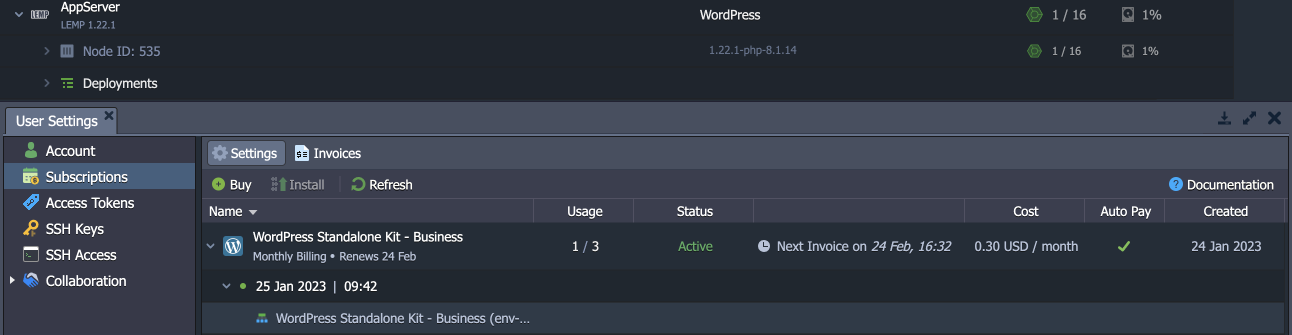 Due to the concept of subscriptions, some actions are restricted for the installed instances (e.g. topology adjustment or environment cloning).
AlmaLinux 8 OS Support
Starting with the current 8.2.4 PaaS release, the alternative OS template for the discontinued CentOS Linux 8 stable release was changed to AlmaLinux 8. AlmaLinux is an open-source 1:1 binary-compatible clone of RHEL that is guided and built by the community. Note: CloudJiffy no longer supports the previously used CentOS Stream 8 operating system template.
What’s Changed?
Extended Environment Metadata
Each environment on the platform has its common information stored via the dedicated JSON file. Such implementation simplifies various internal processes by allowing PaaS to get the required data quickly. Additionally, this data is utilized during the environment export operation. In the current platform upgrade, environments’ metadata was extended with a JSON field for various additional information (e.g. ProjectName or ProjectScope).
Custom Data in Cloud Scripting Response
Cloud Scripting is a platform-dedicated programming language developed for application packaging, operation automation, and complex CI/CD flows integration. This powerful automation tool implements popular solutions such as the Let’s Encrypt add-on or various auto-clusters. It can also be utilized by platform end-users to automate their own operations. In the current 8.2.4 PaaS release, the ability to return custom data with the API request response was implemented. For example, it is used to add information on the skipped domains to the Let’s Encrypt add-on installation response.
SSL Installation Error Description
The platform offers multiple ways of working with the SSL security protocol for establishing an encrypted connection between environments and the web. However, sometimes the certificate installation fails without providing a user with a clear description of the issue. In order to help our customers, the non-descriptive “SSL installed with Error!” message was replaced with a more detailed response that is based on the actually occurred problem.
Refilling with 3DS Cards
3D Secure (3DS) protocol adds an extra layer of payment authentication for additional fraud protection during an online transaction. If used, the cardholder is asked to provide proof of identity by entering a unique password, an SMS code, or a temporary PIN. 3DS can be mandatory in some regions (e.g. Europe due to the Strong Customer Authentication regulation) and optional in others (but still can be used to reduce fraud). When refilling the account balance using the saved payment method with the 3DS, the platform will provide an explicit notification that the invoice was created, but the transaction should be completed through additional external authentication.
API Changes
Below, you can find a list of all changes to the public API in the 8.2.4 platform version:
- Added new methods to the environment > control service that allow adding and managing custom data in the environment – AddEnvProperty, RemoveEnvProperty, ApplyEnvProperty, GetEnvProperty
- Added a new Billing > Subscriptions service with API methods to support the subscriptions feature
Software Stack Versions
The software stack provisioning process is independent of the platform release, which allows new software solutions to be delivered as soon as they are ready. However, due to the necessity to adapt and test new stack versions, there is a small delay between software release by its respective upstream maintainer and integration into CloudJiffy Platform.
LOAD BALANCERS
Name & Link to Tags
Latest Supported Version
Apache Balancer
2.4.55
HAProxy
2.2.29; 2.3.10; 2.4.22; 2.5.13; 2.6.12; 2.7.6 EOL: 1.8.14; 1.9.7; 2.0.10; 2.1.7
LiteSpeed Web ADC (HTTP/3 ready)
2.4; 2.5.1; 2.6.1; 2.7; 3.0.3; 3.1.7
NGINX Balancer (HTTP/3 ready)
1.16.1; 1.18.0; 1.20.2; 1.22.1 EOL: 1.10.3; 1.12.2; 1.14.2
Varnish (HTTP/3 ready)
6.0.11; 7.0.3; 7.2.1; 7.3.0 EOL: 4.1.8; 5.2.1; 6.1.1; 6.2.1; 6.3.2; 6.4.0; 6.5.1; 6.6.1; 7.1.2
APPLICATION SERVERS
Name & Link to Tags
Latest Supported Version
.NET Core
3.1.426; 5.0.408; 6.0.406; 7.0.102
Apache PHP
2.4.55 EOL: 2.4.45
Apache Python
2.4.55
Apache Ruby
2.4.55
GlassFish
GlassFish 5.0.0; 5.1.0; 6.1; 6.2.5; 7.0.3 EOL: 3.1.2.2; 4.1.2
Golang
1.17.12; 1.18.10; 1.19.6; 1.20.1 EOL: 1.9.4; 1.10.3; 1.11.13; 1.12.17; 1.13.15; 1.14.15; 1.15.15; 1.16.15
Jetty
9.4.51; 10.0.14; 11.0.14
LEMP (HTTP/3 ready)
1.14.2; 1.16.1; 1.22.1
LiteSpeed Web Server (HTTP/3 ready)
5.3.8; 5.4.12; 6.0.12; 6.1
LLSMP (HTTP/3 ready)
5.3.8; 5.4.12; 6.0.12; 6.1
NGINX PHP (HTTP/3 ready)
1.16.1; 1.18.0; 1.20.2; 1.22.1 EOL: 1.12.2; 1.14.2
NGINX Ruby (HTTP/3 ready)
1.16.1; 1.20.2; 1.22.1 EOL: 1.14.2
NodeJS
14.21.3; 16.19.1 EOL: 6.17.1; 7.10.0; 8.17.0; 9.11.2; 10.24.1; 11.15.0; 12.22.9; 13.14.0; 15.14.0; 17.9.1
Payara
4.1.2.181; 5.2020.5; 5.2021.10; 5.2022.2; 6.2023.3
Spring Boot
2
Tomcat
8.5.87; 9.0.73; 10.0.23; 10.1.7; 11.0.0-M4 EOL: 7.0.109
TomEE
7.0.5; 7.1.0; 8.0.14; 9.0.0
WildFly
25.0.1; 26.1.3; 27.0.1 EOL: 10.1.0; 11.0.0; 12.0.0; 13.0.0; 14.0.1; 15.0.1; 16.0.0; 17.0.1; 18.0.1; 19.1.0; 20.0.1; 21.0.2; 22.0.1; 23.0.1; 24.0.1
DATABASES
Name & Link to Tags
Latest Supported Version
Couchbase CE
5.0.1; 5.1.1; 6.0.0; 6.5.1; 6.6.0; 7.0.2; 7.1.1
MariaDB
10.3.38; 10.4.28; 10.5.19; 10.6.12; 10.7.8; 10.8.7; 10.9.5; 10.10.3; 10.11.2 EOL: 5.5.68; 10.1.24; 10.2.15
MongoDB
3.6.8; 4.0.2 EOL: 2.6.12
MySQL CE
5.7.41; 8.0.32 EOL: 5.6.50
OpenSearch
1.2.4; 1.3.1; 2.0.1; 2.1.1; 2.4.1; 2.5.0
Percona
5.7.39, 8.0.31 EOL: 5.5.41; 5.6.50
PostgreSQL
11.19; 12.14; 13.10; 14.7; 15.2 EOL: 9.6.24; 10.22
Redis
6.0.10; 6.2.11; 7.0.10 EOL: 4.0.11; 5.0.8
ADDITIONAL STACKS
Name & Link to Tags
Latest Supported Version
CentOS (VPS)
7.6; 7.7; 7.8; 7.9
Debian (VPS)
9.13; 10.13; 11.6
Docker Engine CE
19.03.14; 20.10.23; 23.0.3 EOL: 17.12; 18.09.7
Jenkins
2.332.3; 2.346.3; 2.361.4; 2.375.2; 2.387.1 EOL: 2.263.4; 2.289.3; 2.303.3; 2.319.3
Kubernetes
1.16.6; 1.17.12; 1.18.10
Logstash
7.17.0; 8.2.3; 8.3.3; 8.4.2; 8.5.3; 8.6.2; 8.7.0
Maven
3.5.4; 3.6.3; 3.8.6; 3.9.1
Memcached
1.4.24; 1.5.22; 1.6.15
OpenSearch Dashboards
1.2.0; 1.3.2; 2.0.1; 2.1.0; 2.2.0; 2.3.0; 2.4.1; 2.5.0; 2.6.0
Pgpool-II
4.3.3; 4.4.1
Pro__xySQL
1.4.13; 2.0.17; 2.3.2
Shared Storage
2.0-9.6
Ubuntu (VPS)
16.04; 18.04; 20.04; 22.04
ENGINES
Name
Latest Supported Version
AdoptOpenJDK
8.0.312; 11.0.13; 13.0.2; 14.0.2; 15.0.2; 16.0.2 EOL: 9.0.4; 10.0.2; 12.0.2
Alibaba Dragonwell
8.11.12
Amazon Corretto
8.362.08.1; 11.0.18.10.1; 15.0.2.7.1; 16.0.2.7.1; 17.0.6.10.1; 18.0.2.9.1; 19.0.2.7.1
Eclipse OpenJ9
0.11.0 (8u192-b12; 11.0.1); 0.15.1 (8u222-b10; 11.0.4); 0.17.0 (8u232-b09; 11.0.5; 13.0.1); 0.18.1(8u242-b08; 11.0.6; 13.0.2) 0.20.0 (8u252-b09; 11.0.7); 0.21.0 (8u262-b10; 8u265-b01; 11.0.8; 14.0.2); 0.22.0 (15.0.0); 0.23.0 (8u272-b10; 11.0.9); 0.24.0 (8u282-b08; 11.0.10); 0.25.0-16; 0.26.0 (8u292-b10; 11.0.11); 0.27.0 (8u302-b08; 11.0.12); 0.29.0 (8u312-b07; 11.0.13); 0.30.0 (8u322-b06; 11.0.14); 0.32.0 (8u332-b09; 11.0.15); 0.33.1 (8u345-b01; 11.0.16); 0.35.0 (8u352-b08; 11.0.17); 0.36.1 (8u362-b09; 11.0.18) EOL: 0.9.0 (9.0.4.12; 10.0.2); 0.15.1-12.0.2
Eclipse Temurin
8.0.362; 11.0.18; 17.0.6; 18.0.2.1; 19.0.2
GraalVM CE
19.3.1; 20.2.0; 21.3.0; 22.3.1
Liberica JDK
8.0.322; 11.0.14; 13.0.2; 14.0.2; 15.0.0; 16.0.0; 17.0.2 EOL: 12.0.2
Oracle JDK Dev
7.0_79; 8.0_202; 11.0.2 EOL: 9.0.4; 10.0.2
Oracle OpenJDK
7.0.261; 8.0.362; 11.0.18; 13.0.2; 14.0.2; 15.0.2; 16.0.2; 17.0.2; 18.0.2.1; 19.0.2; 20.0.0; 21.ea-b16 EOL: 10.0.2; 12.0.2
Zulu Community
7.0.352; 8.0.362; 11.0.18; 13.0.9; 14.0.2; 15.0.10; 16.0.2; 17.0.6; 18.0.2.1; 19.0.2; 20.0.0 EOL: 12.0.2
PHP
8.0.28; 8.1.17; 8.2.4 EOL: 7.1.33; 7.2.34; 7.3.33; 7.4.33
Ruby
2.7.8; 3.0.6; 3.1.4; 3.2.2 EOL: 2.2.10; 2.3.8; 2.4.10; 2.5.9; 2.6.10
Python
3.6.15; 3.7.16; 3.8.16; 3.9.16; 3.10.10; 3.11.2 EOL: 2.7.18; 3.4.10; 3.5.10
Node.js
14.21.3; 16.19.1 EOL: 6.17.1; 7.10.0; 8.17.0; 9.11.2; 10.24.1; 11.15.0; 12.22.9; 13.14.0; 15.14.0; 17.9.1
.NET
3.1.426; 5.0.408; 6.0.405; 7.0.102
Go
1.17.12; 1.18.10; 1.19.6; 1.20.1 EOL: 1.9.4; 1.10.3; 1.11.13; 1.12.17; 1.13.15; 1.14.15; 1.15.15; 1.16.15
What’s Fixed?
Fixes Compatible with Prior Versions
Below, you can find the fixes that were implemented in the CloudJiffy 8.2.4 release and also integrated into previous platform versions by means of the appropriate patches.
CloudJIffy 8.2.4
Compatible from
Description
JE-55647
3.3
An error occurs when connecting a Docker CE container to the existing Swarm cluster
JE-64407
3.3
Incorrect permissions and file structure errors occur when installing the Plesk application from the Marketplace
JE-64223
5.0
The deploy and undeploy hooks of the Let’s Encrypt add-on don’t work with file paths
JE-61943
5.0.5
Access from the Internet is allowed by the firewall rule configured between Node.js and the load balancer node
JE-61808
5.7.4
An error occurs when cloning an environment with the GlusterFS cluster in the extra layer
JE-64270
5.8
An error occurs when installing the Jenkins DevOps Pack application from the Marketplace
JE-64745
any
An error occurs when installing the Spring Boot Fat Jar Builder application package from the platform Marketplace
JE-64955
any
An error occurs when installing some WordPress plugins on the LiteSpeed and LLSMP servers
JE-65165
any
The “ERR_TOO_MANY_REDIRECTS” error occurs when accessing the admin panel for the WordPress Cluster based on the NGINX server
JE-64833
3.3
An error occurs when installing the osTicket application package based on PHP 8.2 from the platform Marketplace
JE-52335
3.3
An error occurs when deploying a stack on Docker Swarm from the YAML file that is not in the root directory
JE-58868
3.3
All the “incorrect domain” errors for the Let’s Encrypt add-on should have the error coded
JE-60560
3.3
Missing description for the Let’s Encrypt error related to network issues
JE-64794
3.3
An error occurs when installing Eclipse Che from the ‘release candidate’ image version
JE-65224
3.3
An error occurs when accessing the Jitsi application after installation from the platform Marketplace
JE-65452
3.3
An error occurs when installing the Eclipse Che 7.0.0-RC-1.1 application version from the platform Marketplace
JE-65545
3.3
An error occurs when accessing the IOTA application after installation from the platform Marketplace
JE-49507
5.0.5
The httpd service fails on the Apache nodes if the pid file is missing during the container’s start/stop/restart
JE-59151
5.0.5
Cloned LiteSpeed ADC balancer has backends from the original environment listed in the configs
JE-60325
5.0.5
The workerProcesses value is not updated in the lslbd_config.xml file if changed via the add-on
JE-64529
5.0.5
Access to the /home/jelastic home folder is not granted after the FTP add-on installation on the Spring Boot server
JE-65397
5.4
The Varnish load balancer node is not started after the redeployment
JE-60553
5.7
An error occurs when installing Multi-Regional WordPress Cluster
JE-61492
5.7.2
The self-signed SSL certificate is not generated after the LiteSpeed ADC balancer creation
JE-59090
5.7.4
The lsrestart.log file has an incorrect owner on the LiteSpeed and LLSMP servers
JE-59478
5.7.4
Incorrect values in the /etc/jelastic/metainf.conf file on the LLSMP server
JE-59515
5.7.4
The skip-networking option is missing when resetting the MariaDB password on the LEMP/LLSMP servers
JE-60211
5.7.4
The license key registration attempts should be enumerated in LiteSpeed WS and ADC server logs
JE-60629
5.7.4
An error occurs when reloading the LLSMP server with the ‘jem service reload’ command
JE-65020
5.8
An error occurs when restoring from the WordPress backup after the backup storage node is changed
JE-65589
5.8
An error occurs when accessing the Jenkins application after redeployment from the version based on Java 11 to Java 17
JE-65526
any
An error occurs when creating Magento Cluster from the platform Marketplace
JE-65859
3.3
Some Let’s Encrypt processes are not removed after uninstalling the add-on
JE-65546
5.7.4
The “SSL Service Unavailable” error occurs when accessing the LiteSpeed ADC admin panel
Bug Fixes
In the table below, you can see the list of bug fixes applied to the platform starting from CloudJiffy 8.2.4 release:
CloudJiffy 8.2.4
Affected Versions
Description
JE-61250
-
Firewall management via the user dashboard becomes too slow after adding the “Deny Internet Access” rule
JE-64487
-
An error occurs during PHP stacks’ ZDT (zero downtime) deployment
JE-64618
any
The platform dashboard cannot be accessed using the Safari browser
JE-64636
-
A slow response and an incorrect error returned when accessing a non-existing environment on port 4848
JE-64654
-
Incorrect custom SSL certificate management on the SLBs after the environment deletion
JE-64782
7.0.3
The cloudlets usage is not displayed for the Ubuntu VM environments, and the topology cannot be changed
JE-64802
-
Performance degradation after importing an environment into the shared group as a collaborator
JE-64915
-
The custom domains field is not updated after the Let’s Encrypt add-on reconfiguration
JE-64925
7.3
New account registration does not work if the provided password contains the backslash character
JE-65170
8.2
An error occurs when mounting files from some custom Docker containers
JE-65227
-
Errors are logged during projects auto-deploy on containers with enabled sendmail functionality
JE-65272
-
An error occurs when executing some commands that include a file download operation
JE-65325
-
Custom Docker containers cannot be created from images that use the OCI manifest schema
JE-65414
-
A scroll slider appears in the environment configuration settings panel even if there is enough space to fit the content
JE-65499
-
The shared files owner is changed to root when resetting a password for the FTP add-on on the Shared Storage node
JE-65625
7.2
The URL_DOCS_OOM_KILLER_TROUBLESHOOTING placeholder is not replaced with a link in emails
Ready to deploy on Cloudjiffy?
Start your 14-day free trial — no credit card required.
Create free account