
How to install Kimai time tracking on CloudJiffy
Kimai is one of the best Open-source software available for time tracking for free. It is a simple, easy to use and browser-based interface that runs across platforms with accessibility even from your mobile devices. You don’t need Kimai to be running all the time in the background. With Kimai’s cloud-based tracking solution, you can quit a browser and your time is still being recorded until you log in from another browser and stop the recording. With over 14 years of development, Kimai provides the below features:
- Cross-Platform support like PC, mobile, etc
- Multiple user access in Multiple languages
- Manage your Teams, Customers and Projects
- Track each activity down to a single unit of work
- Keep a track of your Expenses based on customer, projects, and activities
- Integrate Kimai with other application
- Supports Active Directory and SSON
- Provides you detailed statistics and you can also Export data anytime
- Custom time records like time format, Time Clock Mode, Duration only Mode, etc
- Custom filters, Rates calculation based on various parameters and Custom invoices
- User Self-registration, User profile, Permissions, Theming, Password reset via email
- Uses up to date technologies and framework, Allows archiving and SQLite Support.
Why use it on CloudJiffy?
- One-Click Installation
- Easy to manage
- Charges based purely on consumption (Pay As You Consume pricing)
- Real-time scaling with an increase in users
- Data replication and back up solution to keep your data safe.
- Highly secure infrastructure
- Inbuilt CDN to cater to a worldwide audience
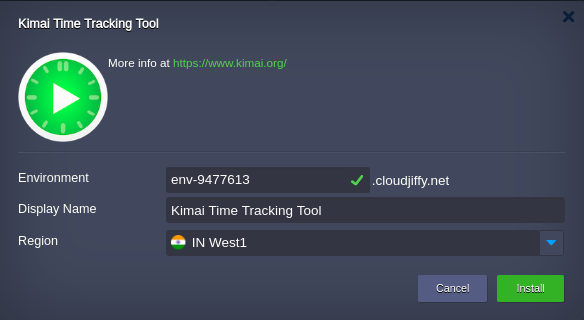
How to install Kimai on CloudJiffy? Step 1: Go to our Marketplace  Step2: Search for Kimai and Give your environment a name and choose a location. We have 3 locations: India, Germany and the USA.
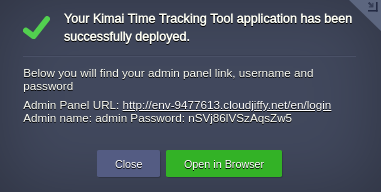
  Step 3: Once the installation is done click on the URL to access your Kiami time tracking tool. It’s as simple as that!
  Don’t have a CloudJiffy account? Just visit our website and click on ‘Free Signup’ and get a trial for 14days.
Ready to deploy on Cloudjiffy?
Start your 14-day free trial — no credit card required.
Create free account